You can manage your subdomains easily through the DirectAdmin portal. This guide walks you through how to add an addon domain in DirectAdmin for your Packetra hosting.
This article applies only to Packetra account holders. It assumes you already logged into DirectAdmin. Don’t have a hosting account yet? Check out our Shared Hosting or WordPress Hosting. Already have one? Log in to your portal. Click the DirectAdmin hosting service, then click the “Log in to DirectAdmin” button on the content page to follow the guide below.
Find the Subdomain Management Section
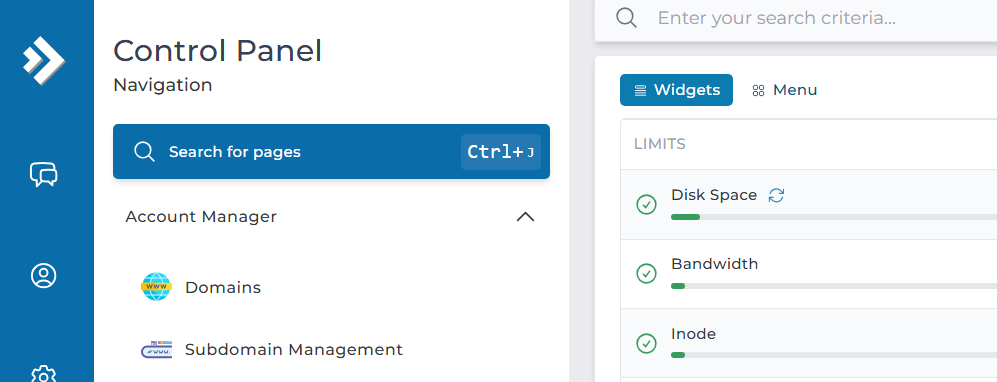
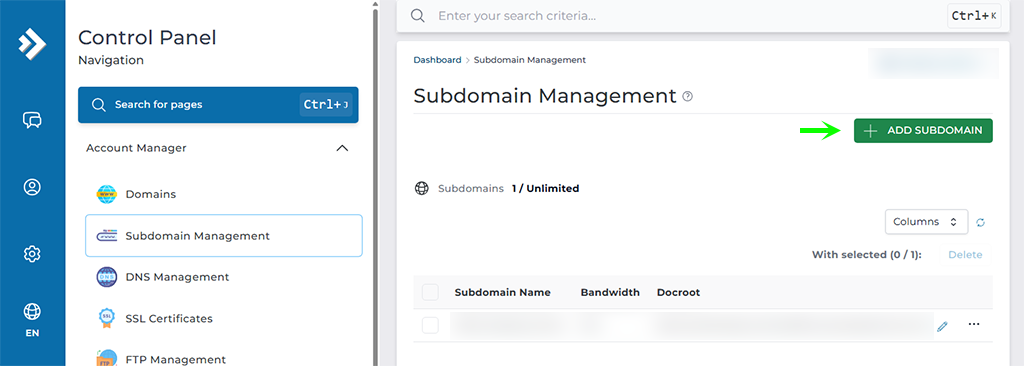
First, open the Account Manager dropdown in the Control Panel navigation. Select the Subdomain Management button. This way, you can add or remove subdomains from your account.
Add a New Subdomain
Next, you will see the default primary domain that came with your profile. Your package allows a set number of addon domains. This ranges from none to several, depending on your plan.
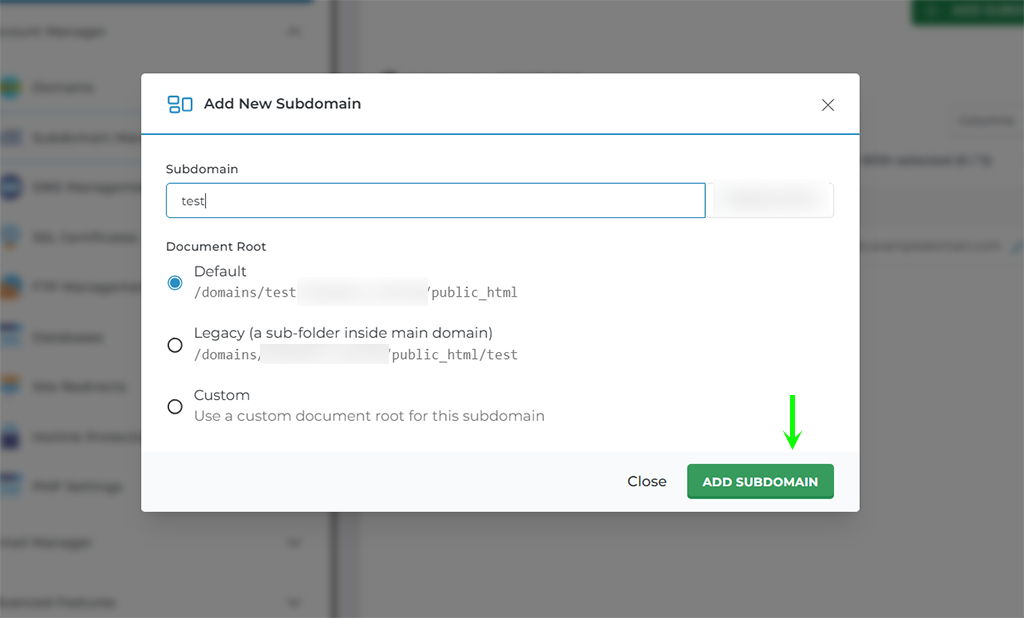
Now set your subdomain. You can select the document root to be the default, legacy or a custom folder where you place your files. When you are ready you click the Add Subdomain button to finalize the action.
Successfully Added a Subdomain
Finally, a green “Domain Created successfully” box appears at the bottom of the screen. The image below shows an example.
That is it. Now you know how to add a subdomain record to your account. Please note that if you are using a 3rd party DNS service such as CloudFlare, you will need to create the same subdomain record in their DNS management for it to take effect as this creates the VHOST record on our end. If you are using our nameservers, no further action is required to activate the subdomain.
Frequently Asked Questions
What’s the difference between a subdomain and an addon domain? A subdomain sits under your existing domain, like blog.johndoe.com. An addon domain is a separate domain name, like janedoe.com. Use a subdomain when you want a section of the same site on its own space.
Why isn’t my subdomain working yet? Check your DNS first. If you use a third-party service such as Cloudflare, you must add the matching subdomain record there too. Our end only creates the VHOST record. So the subdomain won’t resolve until the DNS points the right way. Where do I put my subdomain files? It depends on the document root you picked. You can use the default folder, the legacy path, or a custom folder. Then upload your files to whichever root you set when you created the subdomain.
Good to Know Subdomains give you a clean way to organize separate sections of your site. For example, you might run a shop at store.johndoe.com or a help center at support.johndoe.com. Each one can hold its own files. Keep the DNS side in mind. If you use our nameservers, the subdomain activates on its own. However, if you run your DNS elsewhere, you must create the same record there as well. As a result, the subdomain stays inactive until both sides match. Run into any issues? Open a support ticket through the client portal and our team will help you.