You can manage your addon domains easily through the DirectAdmin portal. This guide walks you through how to add an addon domain in DirectAdmin for your Packetra hosting.
This article applies only to Packetra account holders. It assumes you already logged into DirectAdmin. Don’t have a hosting account yet? Check out our Shared Hosting or WordPress Hosting. Already have one? Log in to your portal. Click the DirectAdmin hosting service, then click the “Log in to DirectAdmin” button on the content page to follow the guide below.
Find the Domains Section
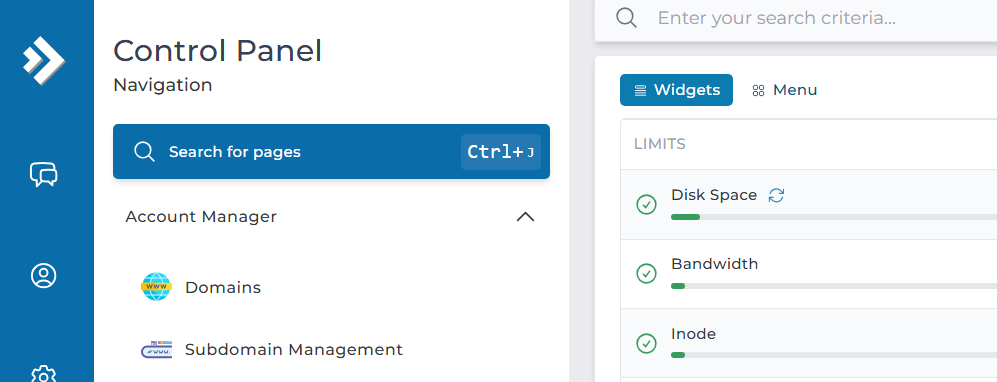
First, open the Account Manager dropdown in the Control Panel navigation. Select the Domains button. This way, you can add or remove domains from your account.
Add a New Domain
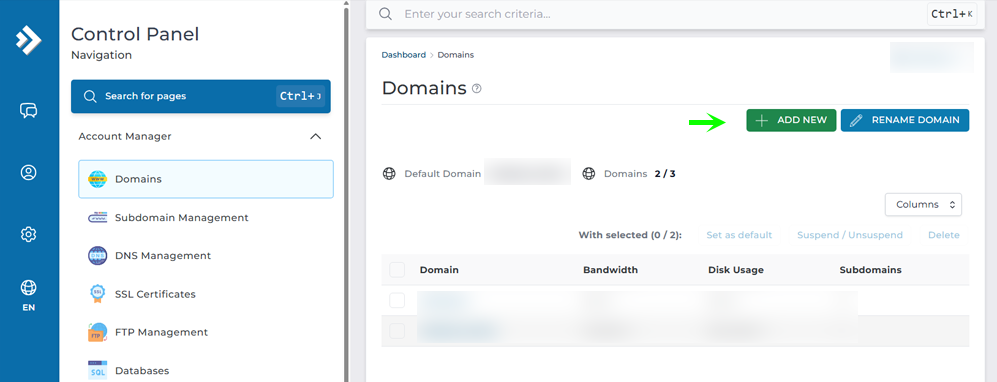
Next, you will see the default primary domain that came with your profile. Your package allows a set number of addon domains. This ranges from none to several, depending on your plan.
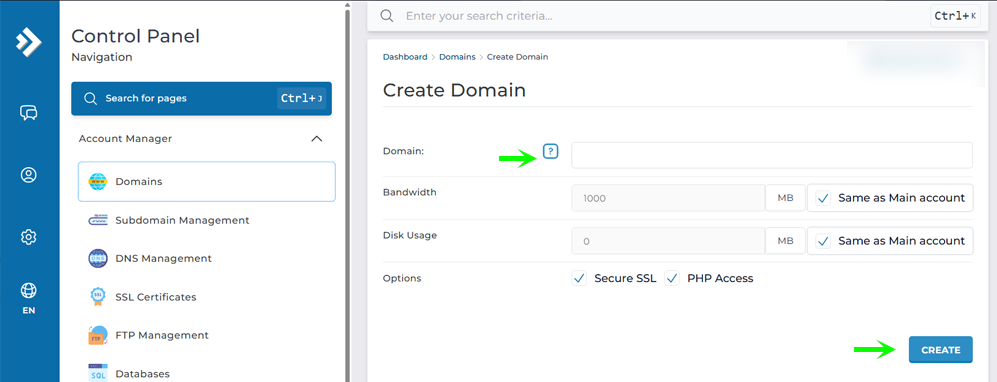
Now set your domain name. Give it properties such as bandwidth or disk usage. You can also let it share the same properties as your main account. Then click Create.
Successfully Added an Addon Domain
Finally, a green “Domain Created successfully” box appears at the bottom of the screen. The image below shows an example.
That is it. Now you know how to add another domain to your account. Say your domain is johndoe.com. The FileManager places it under FileManager > domains > johndoe.com > public_html for your website content.
Frequently Asked Questions
Do I need to own the domain before adding it as an addon domain? Yes. Register the domain before you add it. DirectAdmin lets you create the addon entry. But the site won’t load until the domain’s DNS points to your Packetra server.
How many addon domains can I add to my account? It depends on your plan. Your primary domain comes included. The number of extra addon domains ranges from none to a set limit. So check your current allowance on the Domains page in DirectAdmin. Where are the files for my addon domain stored? Each addon domain gets its own folder. Say your domain is johndoe.com. Your website content then goes under FileManager > domains > johndoe.com > public_html.
Good to Know Adding an addon domain lets you host several websites under one account. This costs less than buying separate plans. If you share your main account’s settings, the addon domain draws from the same bandwidth and disk space. Instead, It won’t have its own limits. Keep an eye on your total resource use as you add more sites. Point the domain’s DNS to your Packetra server before you expect the site to go live. Propagation can take some time after you create the domain. Run into any issues? Open a support ticket through the client portal and our team will help you.