You can manage domain renewal easily through the Packetra client portal. In this guide, we will walk you through how to renew your domain within the Packetra portal. You can renew it ahead of time for your convenience.
This article is only applicable to those who have an account with Packetra and it assumes that you are already logged into the portal. Don’t have a Domain yet? Check out our Domain Choices. If you already have one feel free to login to follow the guide below
Navigate to your Renew Domains
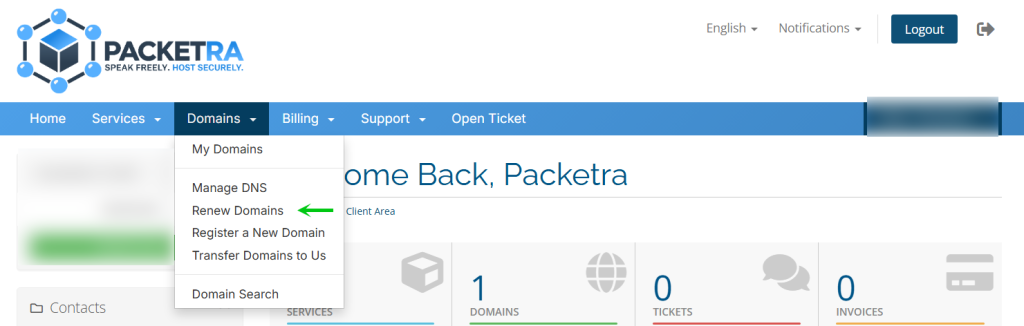
First, click the Domains tab in the top navigation. Then select Renew Domains from the dropdown menu.
Select Domain for Renewal
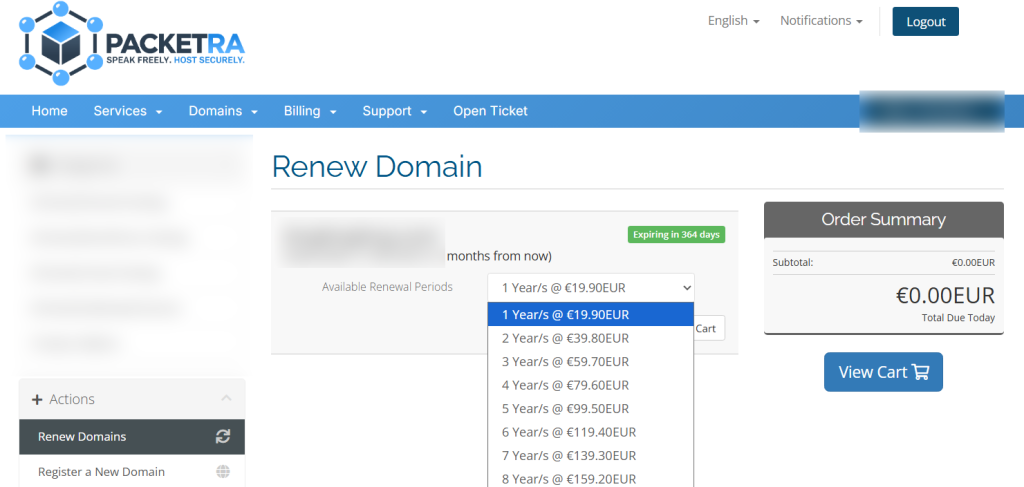
Next, depending on how many domains you have, you will be able to renew them ahead of time by selecting the appropriate amount of years in the dropdown and click Add to Cart.
Select Domain for Renewal
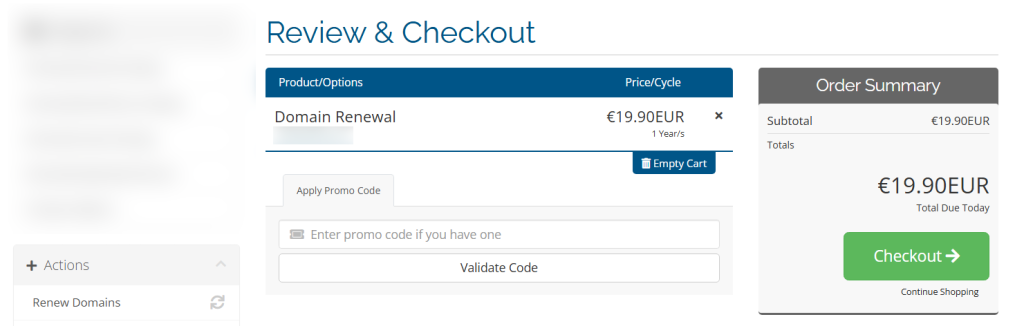
Finally, you click the View Cart and on the next page, finish reviewing your cart and when you are good to go, you click the Checkout green button to finalize your domain renewal.
There you go, now you know how to manage domain renewal within the Packetra portal.
Frequently Asked Questions
Can I renew my domain ahead of time? Yes, you can renew your domain at any time. This is convenient if you want to secure your domain for a longer period or avoid missing a renewal deadline.
What happens if my domain expires? If your domain expires, your website and email will stop working. Most domains enter a grace period after expiration where you can still renew at the normal price. After that, a redemption fee may apply. We strongly recommend renewing early to avoid any downtime.
Can I renew multiple domains at once? Yes. The Renew Domains page lists all your domains. You can add multiple domains to your cart and check out in one transaction.
Good to Know Domain renewals are processed immediately after payment. However, we recommend renewing at least 7 days before the expiration date to avoid any risk of losing your domain. An invoice will be automatically generated as your domain approaches its expiry date, but payment is still your responsibility. Make sure to complete the invoice promptly to avoid any lapse. If you have any issues, open a support ticket through the client portal and our team will assist you.